REVIEW · AUDIO TOURS
Rome’s Ancient Temple: Pantheon Audio Guide (with Optional Entry)
Book on Viator →Operated by Vox City International Ltd · Bookable on Viator
A quick ticket saves your Pantheon time. Pair fast-track entry with a digital audio guide, and you get to explore Rome’s most famous dome at your own pace, with pointers for Raphael’s tomb. Pick a time slot and you can usually avoid the worst ticket chaos.
I like the time slots you can reserve online, down to about a 30-minute window. I also like that the package includes skip-the-line entry, so you spend your energy looking up at the dome instead of standing at a counter.
The trade-off is tech and rules. You’ll need your own mobile phone and headphones, plus a way to download and play the audio, and the Pantheon has a strict dress code. If your phone doesn’t cooperate, you’ll still be inside a masterpiece, but the audio plan may go sideways.
In This Review
- Quick hits before you go
- The Pantheon, on your terms
- Fast-track entry: what skip-the-line really covers
- Your 1-hour self-guided plan inside the dome
- Ticket pickup and the meeting point: small planning, big payoff
- Digital audioguide: QR download, internet, and headphones
- Dress code and comfort: the rules that can stop you at the door
- Timing in Rome: how to choose your time slot
- Is the price worth it for you?
- Who should book this Pantheon audio experience
- Should you book this Pantheon Audio Guide?
- FAQ
- How long is the Pantheon Audio Guide experience?
- Is the Pantheon entry ticket included?
- What language is the audio guide in?
- Do I need headphones and a phone for the audio guide?
- How do I access the audioguide on my phone?
- What ticket do I need at the Pantheon entrance?
- What is the cancellation window?
Quick hits before you go

- Fast-track mainly helps with the ticket line, not with entry controls and security checks.
- Time slots are specific, so you can plan around peak crowds.
- The audioguide is QR-based, delivered through a phone download rather than an on-site headset.
- Raphael’s tomb is part of the audio route, so you don’t miss a key moment.
- No shorts, no sleeveless tops, no vests at the door.
- Audio Guide Only is separate from entry—double-check you’re choosing the option you need.
The Pantheon, on your terms

The Pantheon is one of those Rome sights where the architecture hits you before you even start thinking about captions. This experience is designed to keep you moving without tying you to a live guide’s pace. You show up for your selected time, walk in, then use the digital audioguide to steer you through the highlights at whatever speed feels right.
That flexibility is the big appeal. If you like to look closely, pause for photos, and linger under the dome a little longer, this format fits. You also get guidance for specific must-sees—like Raphael’s tomb—which helps if you’re not an expert on what you’re looking at.
You can also read our reviews of more guided tours in Rome



Fast-track entry: what skip-the-line really covers

Skip-the-line sounds simple, but in busy Rome it helps to know what you’re skipping. This ticket includes fast-track entry when selected, which is meant to reduce the time spent at the busiest ticket steps.
One important nuance: even with fast-track, you’re not magically exempt from queues for the actual physical entry. The Pantheon’s own rules, security checks, and crowd flow can still create lines. Translation: fast-track tends to save you from the worst ticket-buy bottleneck, but you should still plan for some waiting, especially at peak times.
Here’s what that means for your day:
- Book a time slot and treat it as a target, not a suggestion.
- Keep your official ticket ready to show at the entrance area so you don’t get slowed down at the worst possible moment.
- If you’re traveling during high season, assume the whole area can be crowded, even if the ticket side is faster.
Your 1-hour self-guided plan inside the dome
The visit is listed at about 1 hour, but in real life it usually comes down to how much you stop and how much you move. The experience is built around one main stop: the Pantheon.
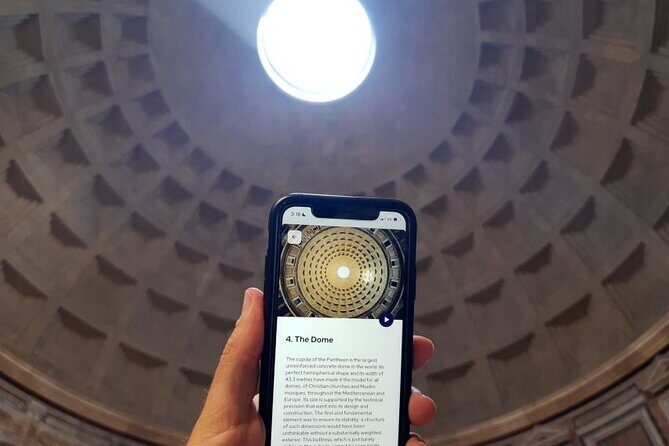
Once you’re inside, the audioguide is what turns a walk-through into a guided-feeling loop. Instead of reading placards only, you listen on your phone as you go. The audio is in English, and it’s meant to help you spot the key details as you pass them—again, including Raphael’s tomb.
A smart way to use the time:
- Start listening right away so you get context before you’re standing in front of the main features.
- Let the audio route guide your pace. If you jump around, you can end up hearing the “next part” while you’re already looking at something else.
- Use play/pause as needed, especially when crowds block your view or when you need to take a step back to reframe photos.
If you’re the type who likes to absorb quickly and move on, you’ll likely be happy with a shorter visit. If you like to soak it in, you may go a bit longer, but the overall package is still designed for a quick hit.
Ticket pickup and the meeting point: small planning, big payoff

This is one of those experiences where your success depends on prep. The product includes assistance at the meeting point, and it’s near public transportation, which helps.
But the area around major attractions can be confusing. Some people report difficulty finding the ticket office or needing extra time to locate the correct window/line. Others describe a smoother setup where pickup is quick and then you’re walking to the Pantheon soon after.
So what should you do?
- Give yourself extra buffer time before your slot. Even if your entry time is scheduled, the pickup and lines around the ticket process can take longer than you expect.
- Bring the right documents in the right format. This matters because Viator vouchers aren’t accepted at the Pantheon entrance. You must bring the official ticket.
- If you’re arriving at the last second, you increase the odds of missing steps or getting stuck behind someone else who needs help.
Also, note how the ticket arrives. If you buy entry, the entry ticket is available to download within 24 hours before your travel date, and e-tickets are sent via WhatsApp and email from Vox City. That means you shouldn’t rely on loading everything from scratch at the gate. Check your phone earlier.
Digital audioguide: QR download, internet, and headphones

This is where the experience is either effortless or a little annoying, depending on your phone setup. The audio guide is included with the package, but you supply the hardware. Headphones and your mobile device are not included.
You’ll also need the basics to make the audioguide work:
- A smartphone
- Headphones
- Enough connectivity to download and play the audio
The download method is straightforward in principle: scan a QR code from your voucher and download the audioguide directly to your phone. The key word is download. If your connection is weak, or if your phone battery is low, the experience can stall at the exact moment you want to start listening.
A few practical tips to avoid the common “where do I tap” moment:
- Before you leave, charge your phone and bring headphones that actually work (test them once).
- When you reach the pickup area, check that the QR download is ready and that playback works.
- If your audio doesn’t load, don’t burn time at the entrance. Step aside, troubleshoot quickly, and if needed be ready to enjoy the Pantheon using what you see and read in the space.
The audioguide is meant to steer you to standout details, like Raphael’s tomb, so it’s worth getting working. But it’s still an app-based experience. If you prefer guaranteed audio support on-site or you don’t want to deal with downloads, you might prefer a different format.
You can also read our reviews of more tours and experiences in Rome






Dress code and comfort: the rules that can stop you at the door
The Pantheon enforces a strict dress code. Plan your outfit so you’re not stuck changing last-minute at a busy attraction.
The requirements are:
- No shorts
- No vests
- No sleeveless tops
Even if you have a fast-track ticket, you can still be turned away for the wrong clothing. Rome in summer is hot, so this catches people off guard. Bring a light layer you can throw on if needed, and keep your outfit Pantheon-friendly from the start.
Comfort also matters because crowds can limit your view. The dome and interior invite you to look up, but busy conditions can make it harder to hold your position for photos. Wear shoes you can stand in, and expect more crowd motion than “museum quiet.”
Timing in Rome: how to choose your time slot

The experience offers a wide choice of time slots, and you can book online with timing precision down to about a 30-minute window. That’s useful, because the Pantheon area gets hectic.
Here’s the practical takeaway: if you pick a time in the middle of peak crowds, the skip-the-line benefit still has to run through the real-world flow of a major monument. Some people report long waits when entering, even with fast-track, because the physical entry process can be busy.
So aim strategically:
- If you want less stress, choose a slot that puts you away from the busiest hours.
- Plan to arrive early enough to pick up your official ticket and get your phone ready for the audio download.
- If you’ve got a tight schedule in Rome, this is still a manageable experience because it’s built for about one hour inside.
Is the price worth it for you?

At $3.57 per person, this is priced like an add-on that helps you move faster and adds context. That’s the value equation here: you’re paying for time savings and a digital audioguide, not for a live guide spending their whole hour talking.
That can be a great deal if:
- You want to self-guide and don’t need a human voice constantly explaining everything.
- You’ll actually use the audio and don’t mind phone-based listening.
- You want an easier path into the Pantheon during a crowded time.
It may feel less worth it if:
- You don’t want to depend on your phone, downloads, or connectivity.
- You prefer a guided narrative with someone who can adjust on the spot.
- You already have entry tickets and only want audio—but you choose the wrong option and end up without what you thought was included.
One more caution: there’s an Audio Guide Only option. If you select that, it does not include entry. If you already have tickets, that can be perfect. If you don’t, make sure you choose Ticket + Audio Guide.
Who should book this Pantheon audio experience
This setup tends to work best for people who want control over pace and don’t mind doing a little tech prep. I’d put it in the same category as a “grab-and-go” Rome experience: solid if you show up ready.
You’ll probably be happy if you:
- Want a shorter visit around an hour
- Like self-paced sightseeing
- Will bring headphones and know how to use your phone’s QR-based download
- Appreciate route guidance, especially for specific highlights like Raphael’s tomb
You might want to think twice if:
- You have trouble with apps, scanning codes, or downloading content on a phone
- You’re traveling with someone who will freeze at the first tech step
- You expect the audioguide to replace a live guide’s explanations entirely
Should you book this Pantheon Audio Guide?
I’d book it if your top goals are fast entry and a guided-feeling route without joining a big-group tour. The low price also makes sense for a one-hour, self-guided experience, as long as you’re prepared to bring headphones, a charged phone, and the mindset that you’ll spend a few minutes getting the audio set up.
Don’t book it blindly if you’re worried about phone downloads or you’re not sure which option includes entry. Check whether you’re getting Ticket + Audio Guide or Audio Guide Only, and remember that Viator vouchers won’t get you into the Pantheon—you’ll need the official ticket.
If you do the basics right, this is one of the more practical ways to see the Pantheon fast and still feel informed while you’re there.
FAQ
How long is the Pantheon Audio Guide experience?
It’s listed at about 1 hour.
Is the Pantheon entry ticket included?
It depends on the option. The Ticket + Audio Guide includes admission with fast-track entry (if selected). The Audio Guide Only option includes only the digital audioguide and does not include entry.
What language is the audio guide in?
The audio guide is offered in English.
Do I need headphones and a phone for the audio guide?
Yes. Headphones and your mobile device are not included. You’ll need both to listen.
How do I access the audioguide on my phone?
You use a QR code from your voucher to download the audioguide to your mobile phone.
What ticket do I need at the Pantheon entrance?
Viator vouchers are not accepted at the Pantheon entrance. You must bring the official ticket.
What is the cancellation window?
You can cancel for a full refund up to 24 hours in advance of the experience start time.